
 Add-ons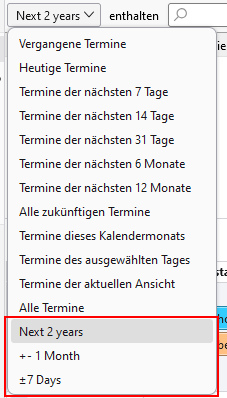
Definiere eigene Zeitbereiche für die Terminsuche |
Define your own time ranges for appointment searches |
| Dieses Add-on erlaubt es, der Terminsuche eigene Zeitbereiche hinzuzufügen. | This add-on allows you to add your own time ranges to the 'Find events pane'. |
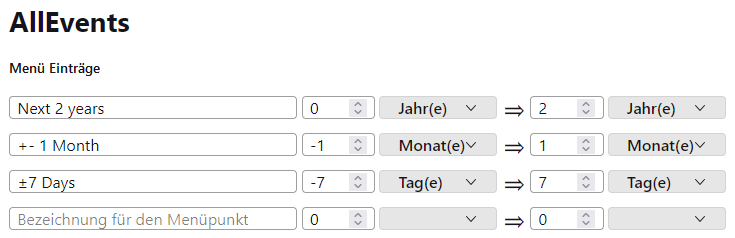
| In den Einstellungen des Add-ons kann der Zeitraum für die Menüpunkte angepasste werden. Außerdem können dort weitere Menüpunkte definiert werden. | The time period for the menu items can be adjusted in the add-on settings. Also additional menu items can be defined there. |
| Das berechnete Enddatum ist immer exklusiv. | The calculated end date is always exclusive. |
|
Neueste Version herunterladen
Die Datei speichern. Dann in Thunderbird zu 'Extras' > 'Add-ons und Themes'
gehen, das Zahnradsymbol klicken und 'Add-on aus Datei installieren' auswählen.
|
Download the latest version
Save the file. Then, in Thunderbird, go to 'Tools' > 'Add-ons and Themes',
click the gear icon, and select 'Install Add-on From File'.
|
Versionen |
Versions |
| Date | Version | |
|---|---|---|
| 26.8.2026 | 1.3 |
|
| 5.9.2024 | 1.2 |
|
| 29.8.2024 | 1.1 |
|
| 26.8.2024 | 1.0 |
|
| 5.8.2024 | 0.4 |
|
| 3.8.2024 | 0.3 |
|
| 2.8.2024 | 0.2 |
|
26. August 2026, G.Gersdorf